Memcached Getting Started
Memcached is a free & open source, high-performance, distributed memory object caching system, generic in nature, but intended for use in speeding up dynamic web applications by alleviating database load.
If you have installed Websoft9 Memcached, the following steps is for your quick start
Preparation
- Get the Internet IP of your Server on Cloud
- Check your Inbound of Security Group Rule of Cloud Console to ensure the TCP:11211,9090 is allowed
- Complete Five steps for Domain if you want to use Domain for Memcached
- Get default username and password of Memcached
Memcached Initialization
Steps for you
-
Use SSH tool to connect Memcached Server, then install Telnet
yum install telnet -
Use the telnet to connect Memcached
telnet 127.0.0.1 11211
Trying 127.0.0.1...
Connected to 127.0.0.1.
Escape character is '^]'. -
Run the command
statsto show all Memcached STAT when connection successfulSTAT pid 651
STAT uptime 891
STAT time 1585225158
STAT version 1.4.15
STAT libevent 2.0.21-stable
STAT pointer_size 64
STAT rusage_user 0.005846
STAT rusage_system 0.017539
STAT curr_connections 10
STAT total_connections 12
STAT connection_structures 11
STAT reserved_fds 20
STAT cmd_get 0
STAT cmd_set 0
STAT cmd_flush 0
STAT cmd_touch 0
STAT get_hits 0
STAT get_misses 0
STAT delete_misses 0
STAT delete_hits 0
STAT incr_misses 0
STAT incr_hits 0
STAT decr_misses 0
STAT decr_hits 0
STAT cas_misses 0
STAT cas_hits 0
STAT cas_badval 0
STAT touch_hits 0
STAT touch_misses 0
STAT auth_cmds 0
STAT auth_errors 0
STAT bytes_read 52
STAT bytes_written 21
STAT limit_maxbytes 67108864
STAT accepting_conns 1
STAT listen_disabled_num 0
STAT threads 4
STAT conn_yields 0
STAT hash_power_level 16
STAT hash_bytes 524288
STAT hash_is_expanding 0
STAT bytes 0
STAT curr_items 0
STAT total_items 0
STAT expired_unfetched 0
STAT evicted_unfetched 0
STAT evictions 0
STAT reclaimed 0
END -
Run the command
quitif you want to exist Memcached -
Test Memcached Web-based GUI tool Memcached-admin
More useful Memcached guide, please refer to Memcached Wiki
Having trouble?
Below is for you to solve problem, and you can contact Websoft9 Support or refer to Troubleshoot + FAQ to get more.
Can't connect Memcached by Telnet?
Please make sure you Telnet installed and port 11211 enabled
Memcached QuickStart
For more information, please refer to:Memcached Wiki
Memcached Setup
Memcached GUI
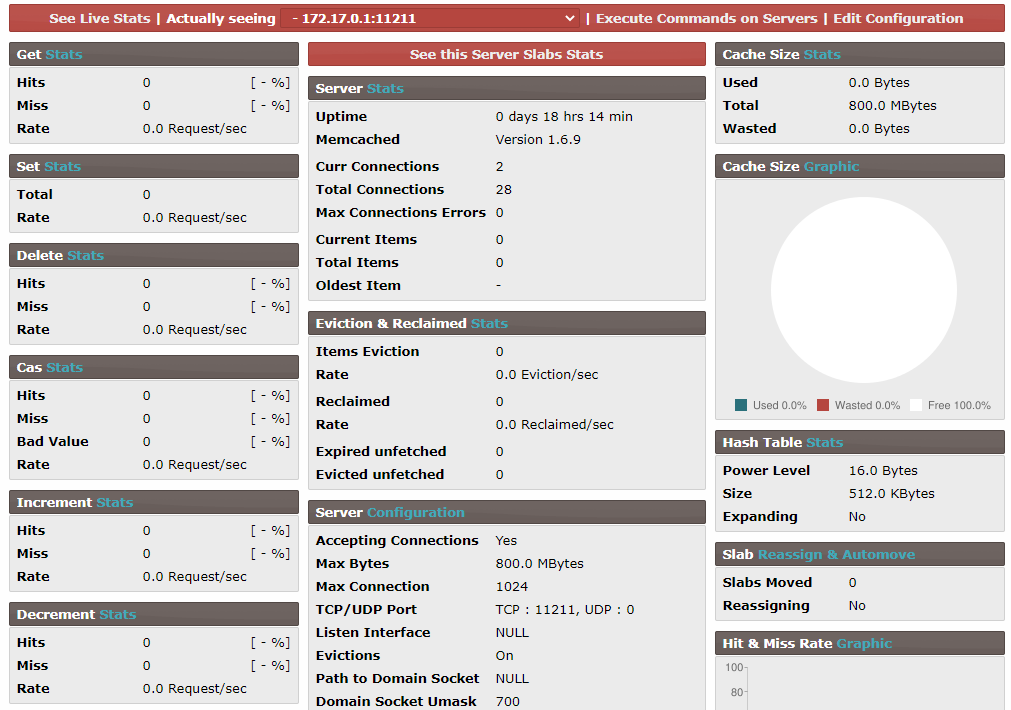
Memcached deployment package includes Web-GUI tool Memcached-admin for monitor
Follow the steps below to use it:
-
Login Cloud Console, make sure the TCP:9090 port is allowed on Inbound of Security Group Rule.
-
Use the Chrome or FireFox to access URL http://Server's Internet IP:9090.
-
Enter username and password of MySQL. (Don't know password?)
-
Start to manage Memcached-admin now.
Memcached Cluster
More details about refer to Memcached Cluster
Reference sheet
The below items and General parameter sheet is maybe useful for you manage Memcached
Run docker ps command, view all Containers when Memcached is running:
CONTAINER ID   IMAGE                                 COMMAND                  CREATED              STATUS              PORTS                                           NAMES
34e1af9ace07   memcached:latest                      "docker-entrypoint.s…"   About a minute ago   Up About a minute   0.0.0.0:11211->11211/tcp, :::11211->11211/tcp   memcached
f3956c005325   hatamiarash7/memcached-admin:latest   "docker-php-entrypoi…"   About a minute ago   Up About a minute   0.0.0.0:9090->80/tcp, :::9090->80/tcp           memcached-panel
Path
Memcached installation directory:/data/apps/memcached
Port
| Port | Use | Necessity |
|---|---|---|
| 11211 | Remote access to Memcached | Optional |
| 9090 | Visit Memcached Admin | Optional |
Version
# Memcached version
docker inspect  memcached | grep MEMCACHED_VERSION
Service
sudo docker start | stop | restart | stats memcached
sudo docker start | stop | restart | stats memcached-admin
CLI
Telnet client
Memcached does not provide specific client. However, standard tools like telnet are enough to test container. Under Linux it is possible to connect by CLI command. We can invoke telnet from host machine, to connect to running Memcached server
- Use SSH to connect Sever and use Telnet connect Memcached
telnet 127.0.0.1 11211
Trying 127.0.0.1...
Connected to 127.0.0.1.
Escape character is '^]'.
- Then, input
statscommand to list all configuration of Memcached
More details please refer to docs: Memcached Commands
Commandline Arguments
If you want to configure Memcached Server, you should configure Commandline Arguments by like below steps:
-
Use SFTP to connect Server and edit /data/db/memcached/docker-compose.yml file, add more items for command parameter
version: '3.8'
services:
memcached:
    image: memcached:${APP_VERSION}
    container_name: ${APP_CONTAINER_NAME}
    restart: always
    command:
- '-m 800' -
Recreate containers
cd /data/db/memcached
sudo docker-compose up -d